
Key takeaways
- Choose the format around the product action or buyer question.
- Use narration and captions to clarify evidence rather than cover it.
- Keep generated support separate from factual demonstrations.
A product video does not need a face to explain something useful. A presenter-free format can use accurate product footage, screen recordings, annotations, captions, and narration to answer a buyer's question directly. Choose it when the action or detail matters more than the identity of the speaker.
Removing the presenter does not remove the need for a story. The sequence still needs a recognizable question, visible evidence, an explanation of what matters, and a sensible next step. The advantage is more room for the product and fewer opportunities to imply a personal experience that never happened.
Start with the task the viewer needs to understand
Write a concrete question rather than a broad promotional theme. “How does this fold?” gives the video an observable action. “Why is this amazing?” encourages vague praise. The question should help someone decide whether the product fits their situation.
Choose the smallest complete task that answers it. A setup video might cover one connection and the first successful action, rather than every setting. A storage product might show the relevant items being placed inside, with honest scale and configuration.
Use your content pillars to connect the task to a wider educational series. Each video can remain focused while the series covers related decisions. This is more useful than forcing every feature into one fast montage.
The absence of a presenter can also simplify revisions. A changed product fact may require replacing a close-up or narration line rather than rebuilding a face-synchronized scene. That benefit depends on keeping the production modular from the start.
Choose a visual grammar that fits the evidence
A tabletop demonstration works well for physical objects whose operation can be shown clearly. A screen recording suits software tasks. An overhead arrangement can compare included parts. A sequence of verified stills may be enough when motion does not add useful information.
Use camera movement only when it reveals something. A slow orbit can show shape, but a stable view may better explain a mechanism. Decorative movement should not make the important action harder to inspect.
Keep the relationship between shots clear. Show the starting state, the action, and the resulting state. If you cut away during a crucial movement, viewers may not understand what caused the change or may infer that a difficult step was effortless.
The FTC's endorsement guidance is relevant to the product claims communicated by the whole advertisement. A video without a speaker can still imply unsupported performance through its images and editing.
Write narration that explains rather than competes
Narration should identify what the viewer might miss, explain a condition, or connect the action to the question. Avoid describing every obvious movement. “Place the lid on top” may be useful instruction; “you are now seeing a lid” usually adds little.
Use ordinary language and consistent product terms. Keep sentences short enough to follow while watching the action. If a detail requires careful inspection, leave space before introducing another fact.
Do not assign personal experience to an unseen narrator unless it is genuine and properly represented. A voice saying “I used this for months” creates the same evidentiary question whether or not a face appears on screen.
Maintain the terminology in your brand voice guide. A presenter-free video often relies heavily on wording and visual hierarchy, so inconsistent feature names can create unnecessary confusion.
An illustrative video for a reusable cable wrap
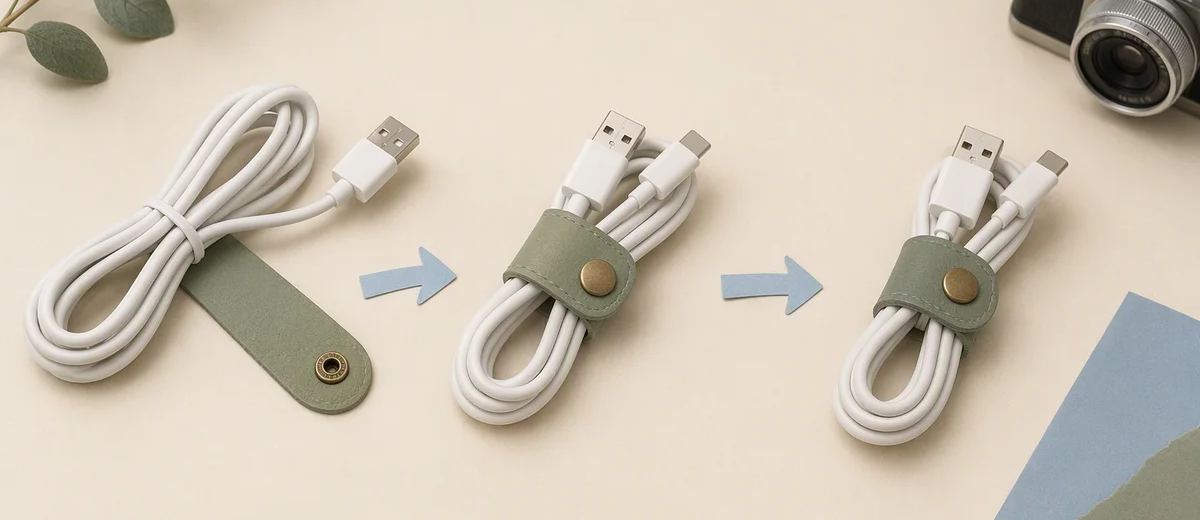
Imagine a brand explaining a small reusable cable wrap. This is a hypothetical production example. The buyer wants to know how it closes and whether it fits the cable bundle they have.
The video opens on the actual cable bundle and wrap. An overhead shot shows the wrap passing around the bundle, then a close view shows the fastening mechanism. The sequence ends with a measured view and a direction to check the available sizes.
The narration explains the fastening action and the relevant size condition. Captions preserve that information without covering the mechanism. There is no invented customer story, dramatic desk transformation, or unsupported promise that the wrap prevents every cable problem.
If a hand is needed to operate the product, it can appear without becoming a presenter. The important requirement is that the action remains accurate and visible. Real footage is preferable when the mechanism itself is the evidence.
Use AI support selectively
AI can help brainstorm the sequence, draft narration, or create clearly illustrative supporting visuals. It should not replace factual product evidence with an imagined action. A generated close-up of a fastening mechanism does not prove how the real mechanism works.
For software, avoid invented screens. Record the current interface in a prepared account, using data you are authorized to show. A clean fictional dashboard can promise controls or outcomes the customer will not receive.
If generated scenes are included, label them in the production record and review the destination's current disclosure requirements. Keep their editorial role clear so later reuse does not turn atmosphere into apparent proof.
The strongest use of automation is often in preparation and variation around a verified core. You can change an opening question or supporting caption while preserving the real demonstration that answers it.
Plan access to both visual and spoken information
A viewer watching without sound needs accurate captions and clear action. A viewer who cannot rely on the image may need spoken explanation of essential visual information. Consider both experiences while writing the sequence.
W3C's media accessibility guidance describes captions, transcripts, descriptions, and related components according to the content. A presenter-free format is not automatically accessible just because the product fills the frame.
Check caption placement on the final crop. A text bar that covers the fastening point can defeat the purpose of the demonstration. Also inspect contrast, reading time, and whether platform controls overlap important details.
Keep clean source footage and separate text layers. This makes it easier to correct a term, translate instructions, or prepare another aspect ratio without damaging the underlying evidence.
Make the next step match the explanation
If the video answers a compatibility question, link to compatibility information. If it explains a setup task, link to the complete instructions. A generic “get started” destination may force the viewer to search again for the detail that matters.
Use the caption generator to draft surrounding post copy, then check it against the actual demonstration. The caption should not broaden a narrow explanation into an unsupported universal promise.
Caroush's free tools can help prepare companion graphics or text posts. Keep video production and ad delivery as their own workflows, and use the approved factual message consistently across the surrounding assets.
Before release, ask someone unfamiliar with the product to describe the action and its limitation. If they can explain both without guessing, the sequence is doing useful work. If they cannot, revise the framing, timing, or wording before adding more visual decoration.
For a series, keep a small record of the question each video answers. This prevents repeated demonstrations with only different opening copy and makes it easier to identify the next missing explanation. A presenter-free library becomes valuable when each asset resolves a distinct buyer uncertainty.
When choosing a thumbnail, show the actual task or product state rather than adding a face solely to imitate another format. The cover should prepare viewers for the explanation they will receive. A clear opening and honest preview can make the product itself the recognizable subject of the series.
Sources
Frequently asked questions
Can a product video work without a person on screen?
Yes. Clear product footage, screen recordings, annotations, and narration can answer a focused question. The sequence still needs context, evidence, and a useful next step.
Do hands count as a presenter?
Hands can demonstrate a product without creating a spokesperson role. Use accurate footage when the interaction is evidence, and keep the action visible and understandable.
Should I use voiceover or only text?
Choose based on the information and accessibility needs. A combination can help, provided the text is readable and the narration explains important visual details without overwhelming the viewer.
Can Caroush generate these videos?
This guide does not assume that capability. Caroush can support adjacent social copy, visual content, and publishing preparation; use appropriate separate tools for video production.
About Garry
Gaurav Sapkota builds Caroush, a workspace for creating, scheduling, and publishing social content.





